STC BioAccess Pro Enterprise
One connected platform for biometric devices, access control, time & attendance, HR and payroll — built on a real, in-production system that already runs employee lifecycles end to end, not a concept deck.
From the moment a fingerprint is enrolled on a terminal to the moment a payslip is approved, every step lives in one auditable record — no spreadsheets stitched together, no manual re-typing between systems.
- Role-based access
- Multi-site organization
- IDEMIA & UBio integrated
- Arabic / English UI
- Layered, provider-based architecture
A complete workforce & biometric management platform
STC BioAccess Pro Enterprise manages the full lifecycle of an employee — from biometric enrollment and device assignment, through attendance and HR, to payroll — alongside a complete multi-site device organization: company, site, building, floor and device.
The platform is a web-based evolution of an established desktop biometric management application, rebuilt from the ground up on a modern, layered architecture: presentation and routes, services, repositories and domain logic, a provider abstraction layer, and vendor-specific hardware integration underneath. Nothing about that rebuild is theoretical — it is the same engine that already synchronizes real terminals in the field today.
Two ideas run through every module. First, separation of concerns: web application users and enrolled employees are kept as distinct concepts throughout the system, so a person can exist as an employee on the device side while a separate account controls their access to the web application — a security guard’s fingerprint template and an HR administrator’s login are never the same object. Second, traceable synchronization: nothing is pushed to a terminal, and nothing is pulled back from one, without the platform recording what happened, when, and whether it succeeded.
The result is a system that a facility manager, an HR lead and a payroll accountant can all open at the same time, each seeing the slice of the same employee record that matters to their role — without waiting on each other or re-entering the same data twice.
Employee lifecycle
- Biometric enrollment
- Device assignment
- Synchronization
- Attendance collection & calculation
- HR & contracts
- Payroll & payslips
Every stage writes back to the same employee record — nothing lives in a separate silo.
Eight modules, one platform
Each module below is a fully working part of the application today — not a roadmap item. Together they cover the operational surface of a modern workforce: the people, the hardware they touch, the hours they work, and the pay they earn.
Dashboard
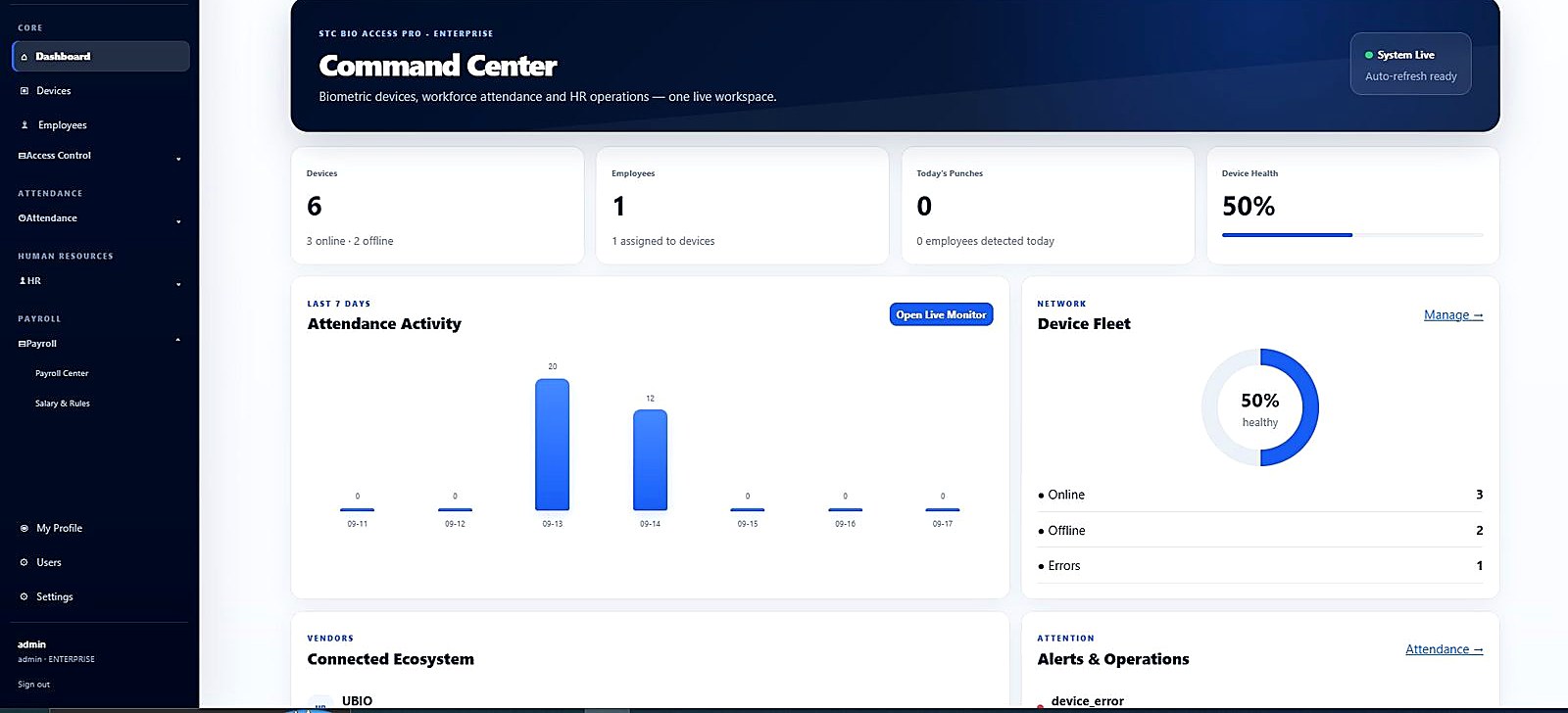
Centralized operational command center for workforce, devices, biometrics, attendance, HR and payroll — the first screen every role sees after login.
Employee Management
Core and extended HR profile data, kept separate from device-syncable identity fields, so hardware sync never touches sensitive HR records by accident.
Biometric Management
Fingerprint and face template storage, enrollment, and controlled device synchronization, with vendor-aware template families.
Device Management
Centralized biometric device fleet management with cached identity, live diagnostics, and grouped operational actions.
Attendance
Automated time & attendance calculated from real device logs, shifts, leave and holidays — not manual timesheets.
HR
Organization, contracts, documents, disciplinary records and loans in one workforce center, tied back to the same employee.
Payroll
Salary components, overtime, deductions, loan installments and approvable payslips, generated from the same attendance data.
Access Control
Device groups, employee groups and schedules combined into enterprise access policies, distinct from attendance shifts.
One employee, one connected record
The employee workspace is organized around five tabs — Overview, HR & Personnel, Attendance, Payroll, and Access & Devices — so every team touches the same record instead of five different exports of it.
Open any employee and the Overview tab already surfaces what most conversations about that person start with: a 30-day attendance snapshot, recent punches, approved leave days, accrued overtime, the current contract, salary and loan indicators, disciplinary indicators, the latest payslip, HR documents, device assignments and biometric enrollment status. A manager doesn’t need five different exports to answer “is this person set up correctly” — the answer is on one screen.
Centralized biometric device fleet management
Cached identity and capability data is shown for every terminal — name, vendor, IP, port, model, serial number, firmware version, MAC address, time zone and connection status — without connecting to every device on every page load. The UI shows what was last confirmed; the operator decides when to refresh it live.
The device workspace was deliberately redesigned around what an operator actually needs first: identity, network and status up top, operational actions grouped together, and low-value vendor telemetry pushed into an advanced section instead of competing for attention.
- Connection test, ping and health check
- Refresh device information and capabilities
- Reboot, read card, download users and access/attendance logs
- Full-row clickable fleet view with grouped operational actions and compact action menus
Capability discovery is vendor-specific; available actions depend on the connected device model and SDK — the platform never presents an action a device cannot actually perform.
Fingerprint & face templates, handled correctly
Biometric data is treated as its own asset class: every template is stored with its modality, template type, group, capture source, quality, source device and capture timestamp — not as an anonymous blob attached to an employee ID.
UBio integration
Native UBio hardware enrollment is preserved as-is for fingerprint capture — the platform does not replace the vendor’s own enrollment dialog with a browser-based imitation. For UBio X‑Face family devices, the platform distinguishes Face Premium, Face Pro, Face WalkThrough and generic face templates by family — so one employee can hold both a Face Pro and a Face Premium template without either overwriting the other, because upload logic filters templates by the target device’s family before sending anything.
For WalkThrough-class enrollment, the platform uses the dedicated WalkThrough registration path rather than treating it as a generic face capture — the captured template, image and metadata are stored and synchronized as their own type.
Card serial number reading is supported from card-capable UBio terminals, with duplicate-card validation across employees. A known UBio timing quirk — where a card-serial callback can briefly report invalid data before the same card event becomes available through the realtime log — is handled by waiting for the realtime data instead of failing the read immediately.
IDEMIA integration
The IDEMIA integration is isolated behind a dedicated provider built on the MA5G Thrift SDK, with its own connection manager, session manager, capability probing and exception translation — the web UI never calls the vendor SDK directly.
Biometric templates are handled through the IDEMIA user-database fields: retrieval, local storage, upload and local/device comparison, using the employee code as the device-side user identifier where applicable.
Card technologies exposed by the IDEMIA SDK (such as ISO14443/MIFARE-family, HID Prox or ISO15693) are recognized where the connected device and SDK support them. Integration work also exists for MorphoWave-class and VisionPass-class devices; feature support there depends on the specific device model and verified SDK capability rather than being assumed uniform across the whole product line.
Local template deletion and device-side deletion are treated as distinct operations. The platform does not advertise device-side biometric deletion where no verified, safe vendor API exists for it.
Controlled synchronization, not silent overwrites
Every employee-to-device relationship carries a state — Not synced, Pending, Synced, Conflict or Error — so an operator always knows whether what’s on a terminal actually matches what’s in the central database.
Push & pull
Assign or unassign an employee to a device, sync a single employee, or run a bulk sync across many employees and many devices at once — including downloading employee data back from a device for comparison.
Conflict handling
When the central record and the device record disagree, the platform surfaces it as a conflict rather than picking a winner automatically. The operator resolves it explicitly: keep local, keep device, or remove the employee from that device.
Full history
Every push, pull, enrollment and conflict resolution is recorded with a status of success, conflict or error — an operational synchronization history, not a full immutable audit ledger, but enough to answer “what happened to this employee’s data, and when.”
Automated time & attendance with real device data
Logs synchronized from connected terminals flow into a calculation engine that accounts for shifts, cross-midnight schedules, breaks, grace periods, working days, holidays and approved leave — the same inputs an experienced attendance officer would check by hand, computed consistently every time.
Raw device events are kept visible and separate from the calculated attendance records they produced, so a disputed day can always be traced back to the exact punches behind it.
- First-in / last-out, worked minutes, lateness, early departure and overtime
- Shifts with cross-midnight logic, breaks and grace periods
- Holiday calendar and leave management, both feeding the calculation directly
- Authorized manual adjustments with a recorded reason, never a silent edit
Live monitoring reflects locally synchronized device events near real time — it is not a cloud CCTV-style livestream.
Shifts, leave, holidays and overtime — connected, not separate spreadsheets
Shifts
Start/end times, cross-midnight handling, break duration and grace periods per shift.
Leave
Type, start/end date, status and reason — approved leave is factored into attendance automatically.
Holidays
Paid or unpaid, with notes, and applied across the attendance calculation for every affected employee.
Overtime
Minutes, status and reason, normalized and ready to be picked up directly by payroll.
An enterprise workforce management center
Branches, departments (with parent/child structure), job titles (with grades) and manager hierarchy sit alongside contracts, a centralized HR document registry, disciplinary records and employee loans — kept separate from the hardware-facing employee fields, so a change to someone’s national ID never has to touch a biometric terminal.
- Contracts: type, start/end date, probation end date and basic salary
- HR document registry with document number, issue and expiry dates
- Disciplinary records — date, type, amount and notes — optionally linked to payroll deductions
- Loans with principal, monthly installment, remaining balance and start date
The HR document registry stores and tracks documents; it does not perform OCR, AI extraction, digital signatures or e-government verification.
From attendance to payslip, without re-entering a single number
Payroll generation combines basic salary, configured salary components (earnings and deductions) and attendance-derived overtime, then subtracts disciplinary deductions and active loan installments, to produce net payroll for the period.
- Salary components configured as earnings or deductions per employee salary line
- Draft and approved payroll runs, with approval restricted to authorized roles
- Payslips per employee, per run, showing basic, earnings, overtime, deductions and net
- CSV export and manual payroll adjustments where required
Payroll logic reflects the platform exactly as implemented; no country-specific tax-law compliance is claimed for any jurisdiction.
A real enterprise access-policy model
Device groups and employee groups combine with access schedules — start/end time, days of week, relay duration and grace period — into prioritized, active/inactive access policies. A policy is not a single rule; it is the intersection of who, where, and when.
The platform preserves raw access and attendance events collected from terminals for diagnostics, while clearly distinguishing them in the UI from the attendance-calculated records they feed into.
Access schedules are a distinct concept from attendance shifts and are never merged in this platform — a door can open on a schedule that has nothing to do with when payroll considers someone “on shift.”
Groups, schedules, policies
Device Groups
Terminals grouped by area, building or function, so a policy can target “all warehouse doors” instead of one device at a time.
Employee Groups
Employees grouped by role, shift pattern or clearance level, independent of the org chart.
Access Schedules
Start/end time, days of week, relay duration and grace period — the “when” that a policy applies.
Current integrations vs. extensible architecture
The platform uses a provider/adapter architecture — a single get_provider(vendor) entry point — so business services stay vendor-agnostic. Two vendors are live today; the architecture is designed to extend to more without rewriting the modules built on top of it.
- IDEMIA — MA5G Thrift SDK, connection & session management, capability probing, RPC diagnostics
- UBio / UBio X‑Face — UCSAPI40.dll server/callback SDK architecture (SDK server on port 9003)
- Suprema
- PERCo
- HID
- VirDI
- NITGEN — integration code and an AccessManager Professional Server SDK package are present in the architecture but currently disabled
Future vendors listed above are not currently live integrations, and none of them should be read as “fully integrated.” Feature support for any vendor — current or future — depends on the connected device model and verified SDK capabilities, not on the brand name alone.
Built in layers, on purpose
The web UI never calls vendor SDKs directly. A single provider abstraction — get_provider(vendor) — routes business services to the correct vendor-specific implementation, keeping hardware detail out of presentation logic entirely. That boundary is what lets the same attendance, HR and payroll modules work unmodified whether the terminal behind them is an IDEMIA unit or a UBio unit.
Organizationally, the platform models Company → Site → Building → Floor → Device, so multi-site deployments are represented natively rather than bolted on. A device can also exist without a complete location hierarchy, for deployments that simply track IP and port connectivity.
Error handling follows the same separation principle: end users see short, professional messages, while operators and developers can inspect the underlying RPC, vendor exception, SDK information, stack trace, device context and operation context — an enterprise troubleshooting layer that doesn’t leak technical noise into the daily user experience.
Enterprise security & role-based access
Every action in the platform is checked against the signed-in user’s role, enforced server-side — not just hidden from the interface.
Admin
Full administration, user management, enterprise configuration and sensitive actions.
Operator
Operational employee, device, attendance and HR actions according to assigned permissions.
Viewer
Read-only operational visibility where permitted — for stakeholders who need to see status without the ability to change it.
Authentication uses server-side session enforcement with role-based authorization. SSO, SAML, OAuth federation, MFA and Active Directory integration are not claimed as current capabilities.
Start where you need to, grow when you’re ready
The platform architecture supports three feature tiers, so a deployment can start with access and biometrics and expand into full workforce management later, without a platform migration.
Lite
Core platform, Access Control and Biometric Management.
Premium
Everything in Lite, plus the full Attendance module.
Enterprise
Everything in Premium, plus HR and Payroll — the complete workforce platform.
Pricing is configured per deployment; contact STC for a quotation tailored to your device fleet and headcount.
Delivered by the integrator, not just a software vendor
STC – Star Technology is a systems integrator that designs, supplies, installs and maintains the biometric and access-control hardware this platform manages — which means the software and the terminals are supported by the same team.
One accountable team
The people who install your terminals are the same people who can explain why the software behaves a certain way with them.
Field-tested engineering
Vendor-specific quirks — like UBio’s card-callback timing — were found and handled because the platform runs against real hardware, not simulators.
Honest scope
Every capability on this page is labeled current or future — nothing is presented as ready before it actually is.
See the application
Real screens from the live application, grouped by module.
Frequently asked questions
Which biometric vendors are actually supported today?
IDEMIA (via the MA5G Thrift SDK) and UBio / UBio X‑Face (via UCSAPI40.dll) are the current, verified integrations. Other vendors listed in the Integration Ecosystem section are architecturally supported but not yet active.
Is NITGEN available?
NITGEN integration code exists in the architecture, including an AccessManager Professional Server SDK package, but it is currently disabled and is not presented as an active production integration.
Does deleting a biometric template in the app delete it from the device?
Not necessarily. Local deletion and device-side deletion are treated as separate actions, and device-side deletion is only offered where a verified, safe vendor API exists for it.
Can the platform handle multiple sites and buildings?
Yes — the location model is Company → Site → Building → Floor → Device, and devices can also exist without a full hierarchy for simpler IP/port-only deployments.
Does payroll calculate taxes for my country?
Payroll logic reflects exactly what is implemented in the platform. No country-specific tax-law compliance is claimed, and this should be verified against your jurisdiction’s requirements before go-live.
Is the interface available in Arabic?
Yes, the application interface can be switched between Arabic and English.
Ready to see it running on your sites?
Talk to STC – Star Technology about a demo or a technical consultation tailored to your device fleet and workforce.
No responses yet